How to Manage Instagram DMs With an API in 2026
Instagram DMs are where the real conversations happen. Support questions, sales, collabs, the occasional angry customer. Meta's Messenger API for Instagram can read and send all of it, but wiring it up means App Review, webhook setup, and juggling the 24-hour messaging window yourself.
PostPeer wraps the whole thing into three endpoints. List your conversations, read a thread, send a reply. OAuth is handled, App Review is handled, and every DM call spends 1 credit, the same as the rest of the API. Here's how to set it up.
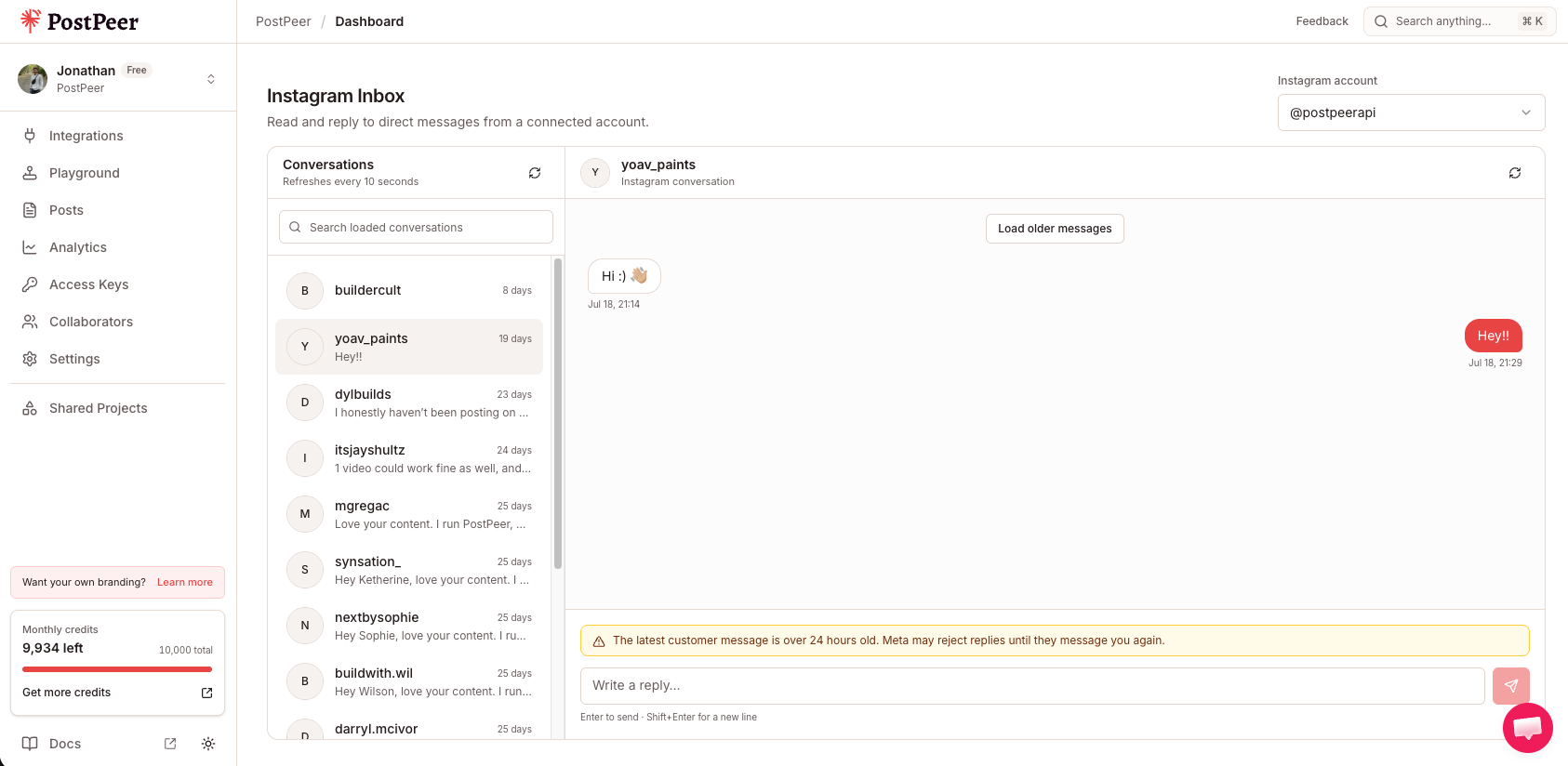
That's the Instagram inbox in the PostPeer dashboard. It's a project inbox for reading and replying to DMs without leaving PostPeer, and it runs on the exact same API you're about to call.
What you need
- A PostPeer account (free tier works)
- Your access key from the dashboard
- An Instagram Business or Creator account (personal accounts can't manage DMs via API, this is Meta's limit, not ours)
Step 1: Get your API key
Sign up at PostPeer, open the dashboard, and grab your access key from the Access Keys page. Every request uses the x-access-key header:
-H "x-access-key: YOUR_API_KEY"Grab your API key from the Access Keys page in your dashboard. Treat it like a password.
Step 2: Connect your Instagram account
PostPeer handles the OAuth flow. For DMs it requests the instagram_business_manage_messages scope from Meta, which is what lets you read and send messages on behalf of the account. Hit the connect endpoint to get an authorization URL:
curl https://api.postpeer.dev/v1/connect/instagram \
  -H "x-access-key: YOUR_API_KEY"
Open the URL it returns, authorize the app, and your Instagram Business account is linked. Then grab the account ID from the integrations endpoint:
curl https://api.postpeer.dev/v1/connect/integrations \
  -H "x-access-key: YOUR_API_KEY"
The response includes an id for each connected account. That's your accountId for every DM call below. Prefer clicking a button? Do the same thing from the PostPeer dashboard.
The one Meta rule you can't ignore: the 24-hour window
Before you start sending, know this. Meta only lets you message a user within 24 hours of their last message to you. Someone DMs you, the clock starts, and you have 24 hours to reply through the API. After that, the send is rejected.
This is a Meta policy, not a PostPeer restriction. It exists to stop businesses from cold-messaging people. In practice it means your bot or workflow should reply promptly, and you can't reach back out to a stale conversation from days ago. Read conversations whenever you want. Sends are what the window applies to.
Step 3: List your conversations
Start by pulling the inbox. GET /v1/messages returns your conversations, newest activity first:
curl "https://api.postpeer.dev/v1/messages?platform=instagram&accountId=your-ig-id&limit=20" \
  -H "x-access-key: YOUR_API_KEY"
You get back your own identity plus a list of threads:
{
  "success": true,
  "selfId": "17841400000000000",
  "selfUsername": "yourbrand",
  "conversations": [
    {
      "id": "aWdfZG1fdGhyZWFk",
      "participants": [
        {
          "id": "17841400000000000",
          "name": "Your Brand",
          "username": "yourbrand",
          "profilePictureUrl": "https://.../you.jpg"
        },
        {
          "id": "9876543210",
          "name": "Dana Lee",
          "username": "danalee",
          "profilePictureUrl": "https://.../dana.jpg"
        }
      ],
      "lastMessage": {
        "id": "bWlkLmZvbw",
        "text": "Hey, is the blue one back in stock?",
        "from": { "id": "9876543210", "name": "Dana Lee" },
        "timestamp": "2026-08-06T14:22:10Z"
      },
      "updatedTime": "2026-08-06T14:22:10Z"
    }
  ],
  "nextCursor": "QVFIUmxk..."
}
selfId and selfUsername tell you which side of a conversation is you, which is handy when you render a thread. Each conversation carries its participants, the lastMessage, and an updatedTime you can sort or filter on. If there are more than limit conversations, pass the nextCursor back as after to page through them.
Step 4: Read a conversation
Take a conversation id from the list and fetch its messages with GET /v1/messages/:conversationId:
curl "https://api.postpeer.dev/v1/messages/aWdfZG1fdGhyZWFk?platform=instagram&accountId=your-ig-id&limit=25" \
  -H "x-access-key: YOUR_API_KEY"
The response is a flat list of messages:
{
  "success": true,
  "messages": [
    {
      "id": "bWlkLmZvbw",
      "text": "Hey, is the blue one back in stock?",
      "from": { "id": "9876543210", "name": "Dana Lee" },
      "timestamp": "2026-08-06T14:22:10Z"
    },
    {
      "id": "bWlkLmJhcg",
      "text": "Thanks for reaching out! Checking now.",
      "from": { "id": "17841400000000000", "name": "Your Brand" },
      "timestamp": "2026-08-06T14:19:02Z"
    }
  ],
  "nextCursor": null
}
Compare each message's from.id against selfId to know who said what. Older messages page in with the after cursor just like conversations.
Step 5: Send a DM reply
To reply, POST to /v1/messages with the recipient's ID and your text. The recipientId is the participant's id, the one that isn't selfId:
curl -X POST https://api.postpeer.dev/v1/messages \
  -H "x-access-key: YOUR_API_KEY" \
  -H "Content-Type: application/json" \
  -d '{
    "platform": "instagram",
    "accountId": "your-ig-id",
    "recipientId": "9876543210",
    "text": "Good news, the blue one is back! Here is the link: https://shop.example.com/blue"
  }'
A successful send returns the new message ID:
{
  "success": true,
  "messageId": "bWlkLmJheg"
}
If the recipient's last message is more than 24 hours old, this send fails on Meta's side. That's the window from earlier. Build your logic so replies go out while the conversation is still warm.
Putting it together
A basic auto-responder is three calls. Poll GET /v1/messages for new activity, read the thread with GET /v1/messages/:conversationId to get context, then POST a reply. Each of those calls spends 1 credit, so poll at a cadence that fits your credit budget.
Want to see it work before writing any code? The free Instagram DM inbox is this same API behind a simple UI. Read and reply to real DMs, then wire the flow into your own app once it feels right.
What's next
That's the full DM loop: list conversations, read a thread, send a reply, all on Instagram Business and Creator accounts. Remember the 24-hour window is the one rule that trips people up, and it's Meta's, not ours.
Full details live on the Instagram DMs API page, and the general API docs cover auth and pagination in more depth. If you also handle public engagement, see how to manage Instagram comments with an API, which follows the same pattern on a different endpoint.
The free tier comes with credits to test the whole thing.